Description
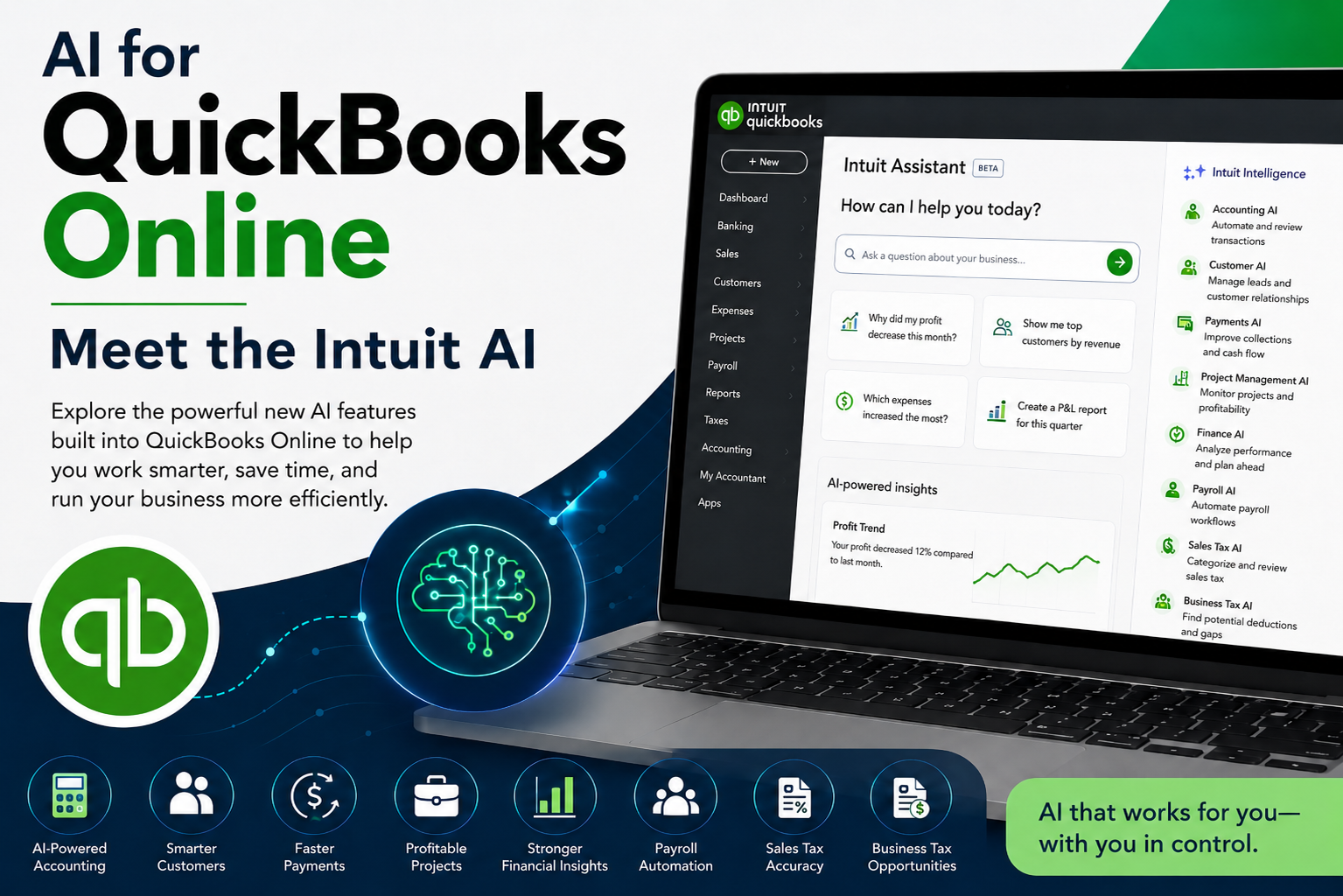
AI for QuickBooks Online: Meet the Intuit AI
QuickBooks Online is changing. Artificial intelligence is no longer something you have to use outside of your accounting software—Intuit is building AI directly into QuickBooks Online to help with accounting, customers, payments, projects, payroll, taxes, and financial decision-making.
But what do these new AI features actually do? Which tasks can they automate? When does QuickBooks ask for your approval? And most importantly, how do you use AI-powered accounting tools while still maintaining accuracy, oversight, and good financial controls?
AI for QuickBooks Online: Meet the New Intuit AI is a practical live webinar designed to introduce QuickBooks users, bookkeepers, accounting professionals, office managers, and small-business owners to the new generation of AI-powered tools available within QuickBooks Online.
This is not a general artificial intelligence class and does not focus on external AI services. The webinar focuses specifically on the AI capabilities Intuit is building directly into QuickBooks Online.
What You’ll Learn
During this webinar, we’ll explore how QuickBooks Online is using AI throughout the accounting and business-management process, including:
- How AI is being integrated directly into QuickBooks Online
- How Accounting AI can assist with bookkeeping and transaction workflows
- How Customer AI can help manage leads and customer relationships
- How Payments AI can assist with getting invoices paid
- How Project Management AI can help monitor projects and profitability
- How Finance AI can help analyze business performance
- How Payroll AI can assist with payroll-related workflows
- How Sales Tax AI can help with sales-tax categorization and review
- How Business Tax AI can identify potential tax-related opportunities
- Where human review and approval still matter
- How AI may change the role of the QuickBooks user, bookkeeper, and business owner
Accounting AI
QuickBooks is moving beyond traditional rules and transaction automation.
We’ll explore how Accounting AI can assist with accounting workflows, review transactions, request additional information when necessary, and help reduce some of the repetitive work involved in maintaining the books.
You’ll also learn why automation does not eliminate the need for accounting knowledge—and why reviewing AI-generated accounting activity remains an important part of maintaining accurate financial records.
Customer AI
Artificial intelligence in QuickBooks is extending beyond the general ledger.
We’ll look at how Customer AI can assist with customer and lead-related activities, including organizing information, managing follow-up activities, supporting customer communications, and helping businesses move opportunities through the sales process.
Payments AI
Getting the invoice out is only part of the process. Getting paid is what matters.
We’ll examine how Payments AI can use information already available within QuickBooks to help identify payment and collection opportunities, assist with customer communications, and provide greater visibility into incoming cash.
Project Management AI
For businesses that track projects, jobs, budgets, and profitability, AI can provide another layer of assistance.
We’ll explore how Project Management AI can help monitor project performance, compare actual results with expectations, identify potential problems, and provide recommendations that may help keep projects on track.
Finance AI
QuickBooks contains a tremendous amount of financial information. AI is making it easier to use that information to understand what is happening inside the business.
We’ll look at how Finance AI can assist with analyzing financial performance, identifying trends, summarizing business information, and helping users ask better questions about the numbers already contained within QuickBooks.
The goal is not to allow AI to make financial decisions for you. The goal is to use AI to help you better understand the information available so you can make more informed decisions.
Payroll AI
Payroll involves some of the most sensitive and important information maintained by a business.
We’ll discuss how Payroll AI can assist with payroll-related workflows, gather and interpret information, and automate portions of the payroll process while maintaining required user review and approval.
We’ll also discuss why AI assistance should never replace appropriate payroll controls and verification.
Sales Tax AI
Sales tax can quickly become complicated as businesses sell different products and services across different jurisdictions.
We’ll examine how Sales Tax AI can help categorize products and services and assist with reviewing sales-tax information for possible errors or inconsistencies before returns are completed.
Business Tax AI
QuickBooks AI is also expanding into business tax preparation and planning.
We’ll explore how Business Tax AI can review information within the books, identify possible gaps, and help surface potential deductions or other areas that may require additional review.
AI can identify possibilities—but the business owner, bookkeeper, accountant, or tax professional remains responsible for determining whether the recommendation is appropriate.
AI Can Assist—You Remain in Control
One of the most important lessons of this webinar is that automation does not eliminate responsibility.
AI may be able to analyze information, recognize patterns, recommend actions, and automate portions of a workflow. That does not mean every recommendation is correct or that every automated action should go unquestioned.
QuickBooks users still need to:
- Review accounting activity
- Verify financial information
- Investigate unusual results
- Maintain appropriate internal controls
- Understand what the AI is recommending
- Know when professional accounting or tax advice is appropriate
- Remain responsible for the final financial records
The role of the QuickBooks user is changing from simply entering information to increasingly reviewing, verifying, managing, and approving AI-assisted workflows.
Who Should Attend?
This webinar is designed for:
- QuickBooks Online users
- Small-business owners
- Bookkeepers
- Accounting clerks
- Office managers
- Administrative professionals
- Accounts payable and accounts receivable staff
- Payroll professionals
- QuickBooks consultants
- Accounting professionals who want an introduction to the new AI capabilities within QBO
You do not need to be an artificial intelligence expert to attend.
A basic familiarity with QuickBooks Online is helpful, but the webinar is designed to explain the new AI functionality in practical, everyday terms.
QuickBooks Is Changing—Know What the New AI Can Do
Artificial intelligence is becoming part of the everyday QuickBooks Online experience.
Understanding these tools now can help you prepare for a workplace where QuickBooks does more than record transactions—it can increasingly assist with analyzing information, managing workflows, identifying problems, and recommending next steps.
AI for QuickBooks Online: Meet the Intuit AI will help you understand what these new tools can do, where they fit into everyday QuickBooks workflows, and why knowledgeable human oversight remains essential.
Live Online Webinar
Learn how the newest generation of QuickBooks Online AI tools is changing bookkeeping, accounting, payments, payroll, taxes, projects, and financial management.
Let QuickBooks AI help with the work—while you remain responsible for the books.